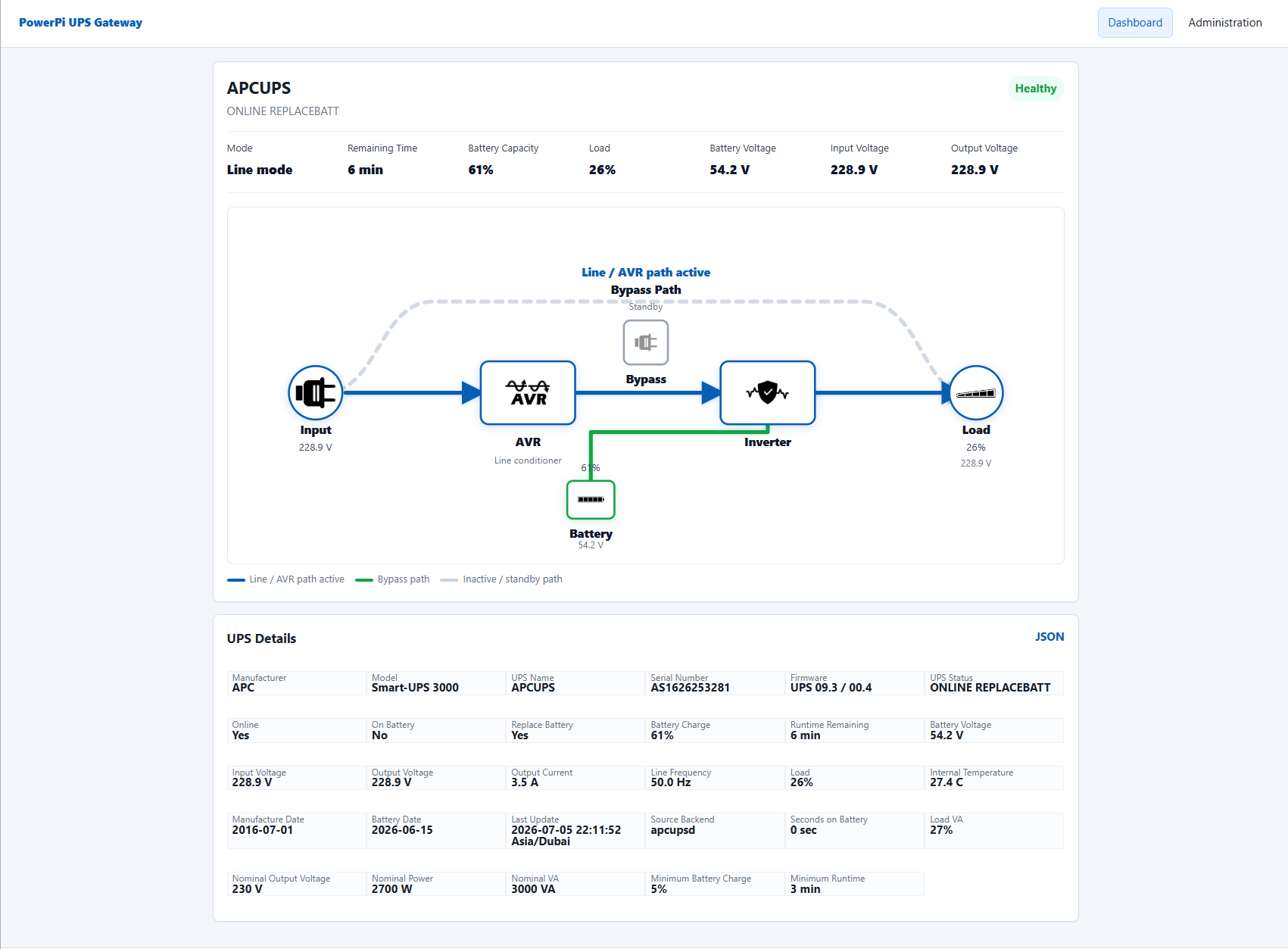
Many APC UPS units work perfectly over USB, but an official APC Network Management Card can be expensive for homelabs, small offices, schools, and branch networks that only need reliable monitoring and shutdown signaling. PowerPi UPS Gateway, or PUG, is an open-source project by VNS that solves that gap with hardware many teams already have: a Raspberry Pi, mini PC, or small Linux host.
PUG reads UPS status locally through apcupsd, NUT, or its simulator, normalizes the data, and republishes it through interfaces that other systems understand. It can behave like an APC UPS SNMP gateway, expose a browser dashboard, publish Prometheus metrics, send MQTT data, and integrate with Home Assistant UPS monitoring.
apcupsd or NUT read it, then let PowerPi UPS Gateway publish that state over APC PowerNet-style SNMP, REST, Prometheus, MQTT, Home Assistant Discovery, and a Web UI.
The problem PUG solves
A UPS is usually the simplest part of the rack until you need every device to know about it. A NAS may expect an APC Network Management Card. A monitoring server may want Prometheus metrics. Home Assistant may need MQTT sensors. A dashboard user may want runtime, voltage, load, transfer status, and raw backend values in one place.
Instead of making every device speak directly to the UPS backend, PUG creates one trusted network-facing endpoint. This is especially useful for QNAP UPS SNMP setups, where the NAS is often happier seeing an APC-style SNMP device than talking to a local USB UPS or an unrelated NUT service.
Architecture
PUG works as an apcupsd SNMP bridge and multi-protocol UPS monitoring dashboard. The backend reads the UPS once. The frontends then publish the same normalized state to the network.
UPS backend
Reads from apcupsd, NUT, or the built-in simulator and keeps the raw values available for diagnostics.
APC SNMP identity
Responds with APC PowerNet-style values so compatible clients can treat PUG like an APC UPS SNMP gateway.
Monitoring outputs
Publishes REST JSON, Prometheus metrics, MQTT topics, and Home Assistant MQTT Discovery entities.
Browser UI
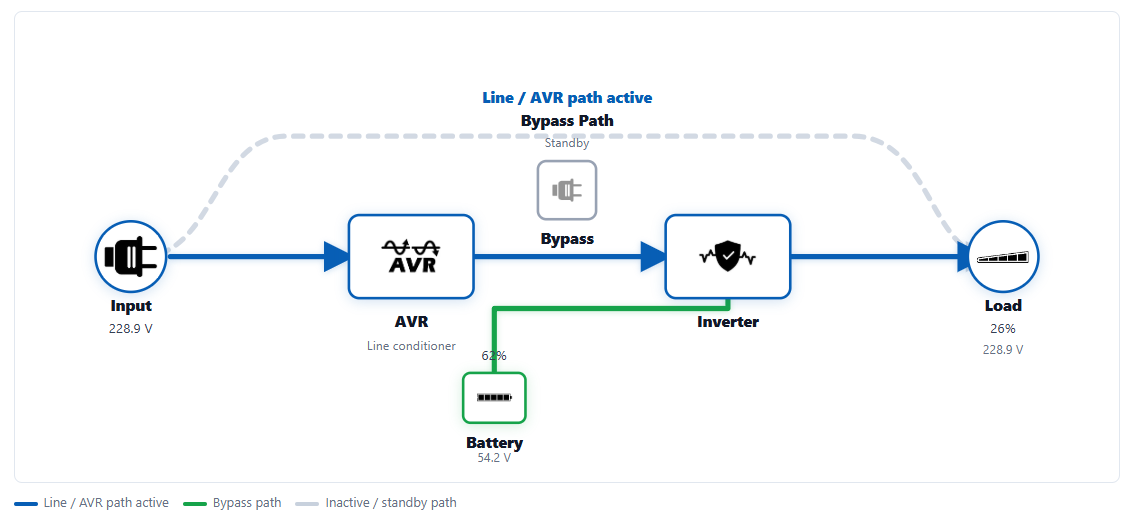
Provides dashboard, live power flow, settings, logs, diagnostics, update checks, and apcupsd controls.
Why not just use NUT everywhere?
NUT is excellent, and PUG can use NUT as a backend. The practical issue is that not every appliance integrates cleanly with every NUT setup. Some NAS devices and network appliances expect an APC Network Management Card emulator or APC UPS SNMP behavior. PUG provides that compatibility layer while still letting you use a working local UPS backend.
Some APC Smart-UPS combinations also expose only a limited set of values depending on driver, firmware, cable type, and UPS generation. PUG lets the Raspberry Pi or Linux host become the one place that talks directly to the UPS, then maps the useful values into formats your network clients expect.
Hardware and software requirements
You do not need much hardware. A small always-on host is enough.
- An APC UPS or compatible UPS readable by
apcupsdor NUT. - A Raspberry Pi, mini PC, Linux server, or virtual machine with network access.
- A USB cable from the UPS to the Linux host.
- Linux or Raspberry Pi OS with Python 3,
git,python3-venv, andpython3-pip. - Optional consumers such as QNAP, Prometheus, MQTT, Home Assistant, or a monitoring service from the VNS NMS hosting stack.
Connect the UPS
First connect the UPS to the Raspberry Pi or Linux host with USB. Install and configure apcupsd, then confirm that the host can read the UPS through apcaccess.
sudo apt update
sudo apt install -y apcupsd
apcaccess status localhost:3551
If everything is working, apcaccess should return values such as UPS model, line voltage, battery charge, load, runtime, and status. Do not skip this verification step. If apcaccess status localhost:3551 is not reading the UPS correctly, PUG will not have good UPS values to publish.
Install PowerPi UPS Gateway
The example below installs PUG in /opt/pug, which matches the included systemd service file.
sudo apt update
sudo apt install -y git python3 python3-venv python3-pip apcupsd

cd /opt
sudo git clone https://git.vns.ae/ahsan/pug.git pug
sudo chown -R "$USER:$USER" /opt/pug

cd /opt/pug
python3 -m venv .venv
. .venv/bin/activate
pip install -e .
cp -n config/config.example.yaml config/config.yaml
The local file config/config.yaml is ignored by Git so future updates do not overwrite your settings.
Configure the backend
For an APC UPS through apcupsd, the default backend is usually enough. This requires apcupsd to be installed, configured, running, and returning real UPS values through apcaccess.
backend:
  type: apcupsd
  command: ["apcaccess", "status", "localhost:3551"]
  poll_interval_seconds: 3
If you use NUT instead, configure the backend for your NUT command, such as upsc ups@localhost. PUG keeps the raw backend values and maps them into normalized UPS state for all frontends.
Run PUG for testing
You can start PUG manually before installing it as a service.
cd /opt/pug
. .venv/bin/activate
sudo python -m pug.main --config config/config.yaml
During early testing, you can also use the built-in simulator.
sudo python -m pug.main --simulator --config config/config.yamlThe Web UI defaults to port 8080.
http://<pug-host-ip>:8080/uiInstall PUG as a service
Once the configuration is working, install the included systemd service.
sudo cp systemd/powerpi-ups-gateway.service /etc/systemd/system/
sudo systemctl daemon-reload
sudo systemctl enable --now powerpi-ups-gateway
sudo journalctl -u powerpi-ups-gateway -f
If your checkout is not in /opt/pug, edit the service file before copying it and update the working directory and command path.
Using PUG with QNAP UPS SNMP
PUG is not only for NAS devices, but QNAP is one of the clearest real-world use cases. Some QNAP network UPS setups do not work smoothly when the UPS is behind NUT or another Linux service. PUG can help by presenting the UPS as an APC-style SNMP device.
- Start PUG on the Raspberry Pi or Linux host connected to the UPS.
- Open the QNAP UPS settings.
- Choose SNMP UPS mode.
- Enter the IP address of the PUG host.
- Use the SNMP community string from the PUG config, defaulting to
public.
QNAP probes the SNMP sysObjectID. PUG responds with APC PowerNet identity information and then answers APC enterprise OIDs for model, battery charge, runtime, input voltage, output voltage, load, battery status, and other UPS values.
Dashboard and live power flow
The Web UI is designed for day-to-day operation, not only initial setup. It shows UPS status, battery state, load, runtime, voltage, raw backend stats, logs, settings, diagnostics, and update checks.
Web UI features
- Live UPS status with battery charge, runtime, load, line voltage, and backend values.
- Power-flow diagram that changes based on online, battery, bypass, AVR, and conversion states.
- Settings for backend, SNMP, HTTP, MQTT, logging, timezone, diagnostics, and update checks.
- Service restart after saving configuration changes.
apcupsdstart, stop, and restart controls.apctestself-test and battery calibration controls with live output.- Browser access to PUG logs and
apcupsdevent logs.
Integrations
PUG is designed to make UPS data reusable across the network. The same collected state can be consumed through multiple outputs.
- SNMP: APC PowerNet-compatible values for NAS appliances and monitoring tools.
- REST: JSON endpoints such as
/api/stateand/api/raw. - Prometheus: metrics at
/metrics. - MQTT: normalized and raw UPS values under a configurable topic prefix.
- Home Assistant: MQTT Discovery for sensors and binary sensors.
- Web UI: dashboard, diagnostics, settings, logs, metrics, and update pages.
Security notes
SNMP v1 and v2c community strings are not strong authentication. Use PUG on trusted networks, bind services to the right interface when possible, change the default community string, and avoid exposing the Web UI or SNMP port directly to the internet. VNS can help design secure network segmentation through our networking and security services.
Port 161 is privileged on Linux, so SNMP on the standard port usually requires root or a service setup with the correct capability. For testing, use a high port such as 1161.
Where PUG fits
PowerPi UPS Gateway is a good fit for homelabs, small offices, schools, managed Wi-Fi sites, edge racks, and branch locations where a full network card is not practical but UPS visibility still matters. It also pairs well with VNS services such as cloud engineering, off-site backup, and hosted monitoring.
Conclusion
PowerPi UPS Gateway turns a Raspberry Pi APC UPS connection into a useful network service. It can reduce hardware cost, simplify QNAP UPS SNMP monitoring, improve Home Assistant UPS visibility, and give monitoring stacks a clean source of UPS data. The project is open source, actively improving, and built around the practical needs of real small-business and homelab networks.
Need help monitoring power, network, or backups?
VNS designs and operates resilient networks, monitoring platforms, backup systems, and private cloud infrastructure for UAE businesses and remote sites.
Talk to VNS View project repository